
Equipment
OptiShot Review – More than Fits the Bill (Sort Of)

If you’re one of the unfortunate souls, like me, that is stuck in Canada or the northern U.S. during the long, cold winter, then you know how hard it is sitting around thinking about golfing rather than actually golfing.
For all my life, until recently at least, my season was made up of six months of outdoor play—if I was lucky—and then six, or more often seven, months of sitting around watching golf on TV and thinking about what went wrong during my last season in oh-so many rounds.
This year, through a set of fortunate circumstances (namely a new neighbor who wanted to get back into the swing of things and resume golfing after a five-year hiatus) and the fact his garage ceiling is higher than mine (9.5 feet compared to 8) we were able to jump onto the “driving range” well ahead of the usual timetable.
This was achieved through the purchase of an OptiShot golf simulator which is priced at $499. I had never used one before so wasn’t sure about its performance but figured that price would be easily offset by calculating I’d spend that on 10 to 15 rounds of virtual reality golf at a local vendor. With the OptiShot, I have everyday use, and with snow still on the ground that made sense.
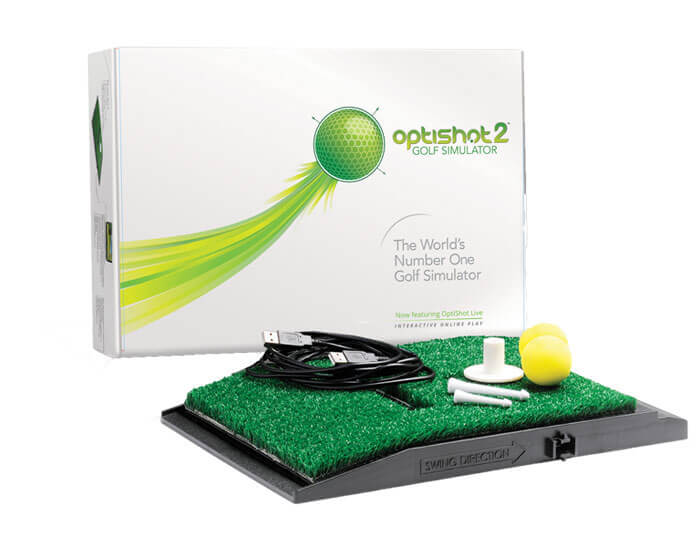
After a bit of fidgeting with the set-up it seems to have been a good purchase. But, that statement comes with a caveat.
First off, it took a while to get the system synced to our swings. You can adjust the readings the machine (which uses 16 infrared sensors in the hitting mat to map speed and angle of the club head) above 100 per cent, but in reality, this doesn’t make sense.
I mean, if you’re swinging as hard as you can with your pitching wedge, and it goes 105 yards on the OptiShot, but 115 yards outside (or you think it goes that far) what number do you believe?
So, why would you crank your indoor swing speed up by five or ten percent, and the distance by an equal amount? I was taught you should never swing as hard as you can, but even so, I tended to favor the machine’s numbers versus my mind’s egotistical numbers.
Now don’t get me wrong, the machine made, and makes, errors every once in a while, especially with the driver. My neighbors driver wouldn’t register at all on the Optishot—which in some cases was a good thing with a shanked or pulled shot, but equally frustrating when he let a good one rip (we are using real balls and hitting into a net—what did I tell you about a good neighbor?).
My driver worked well, at least for a while. Then it too suddenly stopped registering and wouldn’t start up again.
To allay that problem I switched to a 3-wood (well, OK, metal) and left the machine on the Driver setting. Suddenly I was booming some drives over 300 yards which I have only accomplished a couple of times in real life (read on to see why and how). The thing is, this wasn’t just an occasional blip either.
Playing the Plantation Course on Maui, a course I have played a half dozen times, I realized some of the slopes on that track would enable the ball to roll a greater distance than normal (I once hit one 364 yards on the 18th from the back tees (really!) and my latest shot there was 342 from the same tee) so the distances registered weren’t all that out of whack.
Yet on other holes, like the uphill fourth at Plantation (set up with no wind), the machine had registered my 3-wood/driver as flying 290 yards and I know for a fact that is not within my abilities. Of course I never took the ball back to the tee and hit it again, after all, I hit it 290 yards uphill!
That being said, at other times OptiShot seems to be quite realistic with its readings, especially with middle irons, so you’re left wondering if that last shot really could have happened.
The other troubling issue, at least to me, is the putting sequence on the machine. It gives you distances in feet and shows you the slope of the green to the hole but it seems no matter how lightly you tap the ball it is going to scoot 30 to 40 feet the majority of the time.
I worked on this issue for a while, hitting the real ball and also setting the machine to “no ball” which for most is safer for indoor use, but was left feeling frustrated by the inadequacies in this mode, at least in my opinion. As a result of that, we agreed on 20 foot gimmes (I told you this guy was a great neighbor!) which isn’t going to help either one of us when we step outside.
The biggest asset of this gizmo, to me, is the tracers you get on your computer screen when you hit a shot, that enable you to pick out patterns and see how your ball is acting in the air. As well, readings on whether the club face was open or closed and to what degree, and your swing path are beneficial to say the least, as you look at perfecting muscle memory on your swing.
Also, the machine has a swing tempo indicator which is worth its weight in golf balls.
All in all, for the price and the predominately accurate readings we’ve seen (after dialling everything in and changing the lighting in the garage plus blacking out the windows) the OptiShot a good deal for those of us who want to keep working on our game during the wintertime. I have already noticed a tendency for my ball to travel slightly left-to-right in the air with short irons which I didn’t know, and which could explain some of my woes with getting the ball close to the hole.
Would I buy this if I had the room and the money? Yes, if like us you can’t wait to get outside and get playing again. But remember, it’s not perfect.
Then again, neither is anyone’s golf game.
NOTE: To be safe, you need at least 8.5 feet of clearance for swinging a club and if you’re tall, I’d double check that number prior to whaling away with a club and poking a big hole in your ceiling.


LIV Golf Could Be Facing its Final Chapter

Foresight GC2 Review: A Surprisingly Affordable Launch Monitor From Foresight

FIRST LOOK: Rapsodo MLM2XPRO Adds Putting, Faster Performance & More

FIRST LOOK: Titleist’s 2027 Pro V1 and Pro V1x Are Officially Showing Up on Tour

2026 Presidents Cup Preview: Did Team USA Get It Right?
2026 Presidents Cup Preview: Did Team USA Get It Right?
FIRST LOOK: Rapsodo MLM2XPRO Adds Putting, Faster Performance & More
Foresight GC2 Review: A Surprisingly Affordable Launch Monitor From Foresight
FIRST LOOK: Titleist’s 2027 Pro V1 and Pro V1x Are Officially Showing Up on Tour
LIV Golf Could Be Facing its Final Chapter

We Played This Old Golf Course Where Thomas Edison Was A Member

Are You MEASURING Your Golf Swing Correctly? (This Can Help)
Zach Johnson Explains Why He Didn’t Pick Bryson DeChambeau for the Ryder Cup

Justin Thomas FIRES Coach before Ryder Cup…Who’s Next?
